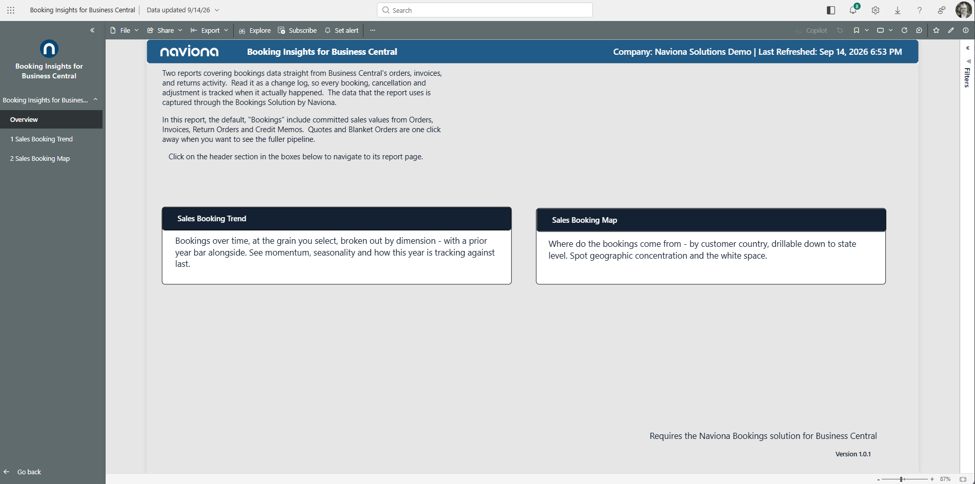
Booking Insights for Business Central is a Power BI app that turns your Business Central sales activity into a clear, current view of bookings. Standard Business Central records each posted document; Naviona’s Bookings Solution records every booking event — each order, invoice, return, credit memo, quote and blanket order — as a change log, dated when it happened. This app reads that data and presents your sales values across two reports: Sales Booking Trend and Sales Booking Map.
It is built for sales managers, controllers, and owners who want to see how bookings are trending against an earlier period and where they come from — without exporting to spreadsheets. By default, “Bookings” include committed sales values from Orders, Invoices, Return Orders, and Credit Memos; Quotes and Blanket Orders are one click away for the fuller pipeline.
What you need before you start
- Microsoft Dynamics 365 Business Central (online) with the Naviona Bookings Solution installed and in use. The app reads bookings from the change log that solution captures — without it, there is no bookings data to show.
- A Power BI Pro (or Premium Per User) license for each person who will view the reports.
- Permission to sign in to your Business Central environment. You connect the app to your own data during setup, using your own Business Central credentials.
How the app is delivered
The app installs from Microsoft AppSource as a self-contained copy in your own Power BI tenant. Your data never leaves your environment, and Naviona has no access to your installed copy unless you explicitly share it. Once installed, you connect it to your Business Central environment and company, and the reports fill with your data.
Finding your way around
The app opens on the Overview page. Every report page has a whole-page Filters panel that scopes all its visuals at once, an information (ⓘ) icon that explains the visuals in place, and a home button to return to the Overview. By default, the reports show committed document types — Orders, Invoices, Return Orders, and Credit Memos; use the Document Type filter to include Quotes and Blanket Orders when you want the speculative pipeline.