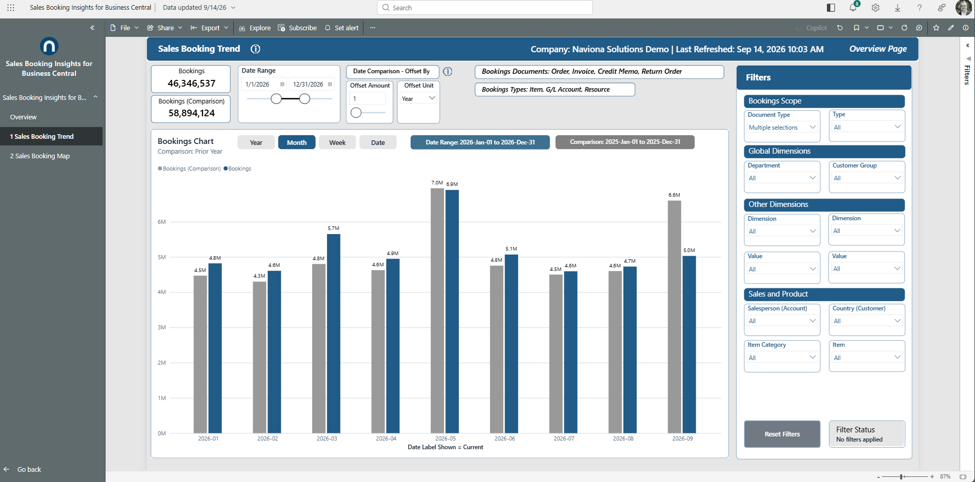
Bookings over a date range you select, grouped by the time grain you pick, beside a comparison period you control. See momentum, seasonality, and how the current window tracks against an earlier one.
What it shows
Booked value by period for the date range you select, beside a comparison bar for an earlier period you choose. Blue bars are bookings in your selected range; gray bars are those same periods shifted back by the date comparison offset. The Document Type and Type captions name which documents and line types are in scope.
Use it to
- Track momentum and seasonality across the period grain you choose.
- Compare the current window against any earlier period — year, month, week, or day by using a custom offset.
- Spot the strong and soft periods at a glance.
- Narrow to a customer, salesperson, region, or dimension value with the Filters panel; both series re-scope together.
How to use the page
- Set the window with the Date Range slicer and the grain with Year, Month, Week, or Date.
- Choose the comparison with the Date Comparison controls — a number and a unit (Days, Weeks, Months, or Years). The gray bars become your periods shifted back by that amount (1 Year = the same periods last year; 3 Months = three months earlier). The subtitle names the active comparison, and the caption cards show both exact date ranges.
- Use the Filters panel to scope every visual; Reset Filters clears it.
Note. The comparison reads best when the offset matches the grain — pair Months or Years with a Month or Week view. Set the number to 1 and the unit to Year for a standard prior-year comparison.