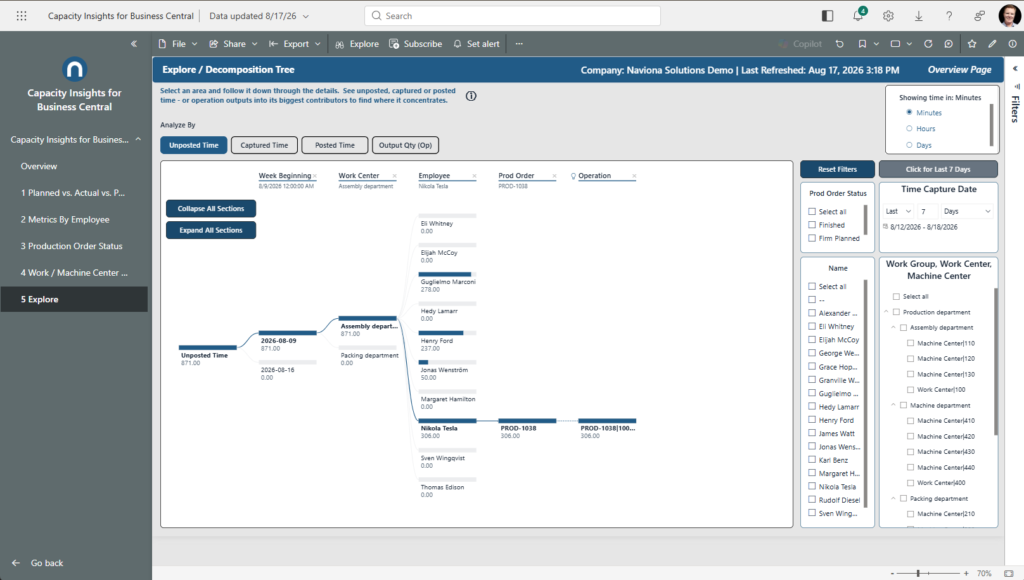
Pick a number and follow it down. Break Unposted, Captured, or Posted time — or Output — into its biggest contributors to find where it concentrates.
What it shows
An interactive breakdown tree. Pick a measure with Analyze By — Unposted, Captured, or Posted time, or Output — then expand each level by a field you choose, or by “High value,” which automatically finds the biggest contributor at that level.
It’s the go-anywhere report: chase captured-but-unposted time down to the exact operations still waiting to post, see where hours concentrate by order, center, employee, or operation, or trace output back to the operations and people that produced it.
Use it to
- Choose what to analyze — set the measure with Analyze By.
- Chase captured-but-unposted time down to the exact operations still waiting to post.
- See where captured or posted hours concentrate — by order, center, employee, or operation.
- Trace output back to its source — the operations and people that produced it.
How to use the page
- Click a + on any node and pick a field to expand — or choose “High value” to auto-find the biggest driver.
- Use Analyze By to change the measure.
- Click the leftmost level’s ✕ to collapse back to the total.
- Use the slicers on the right to scope the data.
Note. Only additive measures appear in Analyze By, so the tree’s parts always sum to the whole. High-value paths re-evaluate as you filter, so they always point at the current biggest driver.