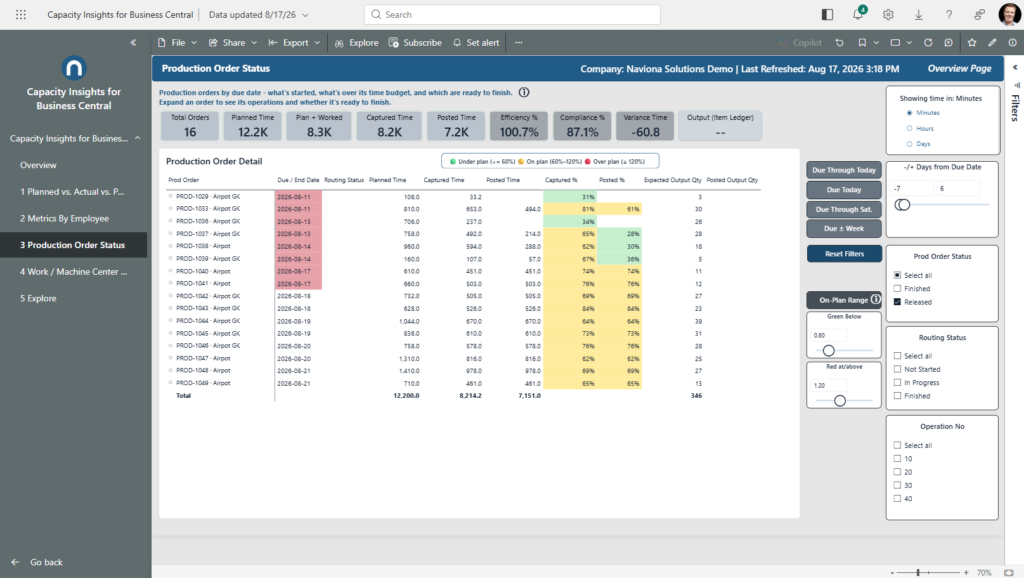
Released orders by due date — what’s started, what’s over its time budget, and which are ready to finish. Expand an order to see its operations.
What it shows
Every released order by due date, with its operations one level down. For each order you see Planned, Captured, and Posted — both time and output. Captured % and Posted % show time-budget status against plan: green is under budget, yellow is on budget, red is over budget. Those thresholds are adjustable, because what counts as “on plan” varies by shop.
Order-level output appears only once the final operation posts (the finished-good count), so an in-progress order doesn’t show a misleading intermediate number. Overdue released orders flag red in the Due / End Date column.
Use it to
- See which released orders are ready to finish — every operation captured and posted.
- Spot orders running over their time budget — the red Captured % / Posted % status.
- Focus on what’s due — the due-date buttons filter to orders by their due date.
- Tune what “on plan” means — click the gear icon and adjust the green / yellow / red thresholds.
How to use the page
- Expand an order to see its operations.
- Use the due-date buttons to filter by due window; the −/+ Days from Due Date slicer sets a custom range.
- Click the gear to show or hide the on-plan threshold sliders.
- Use the Routing Status and other slicers on the right to narrow the list.
Note. Order-level output shows only after the final operation posts, so a started-but-unfinished order can show captured time with no output yet — that’s expected, not missing data.