

The Planning Parameters table specifies how the system will calculate the Planning Parameters for each combination of ABC Classification.
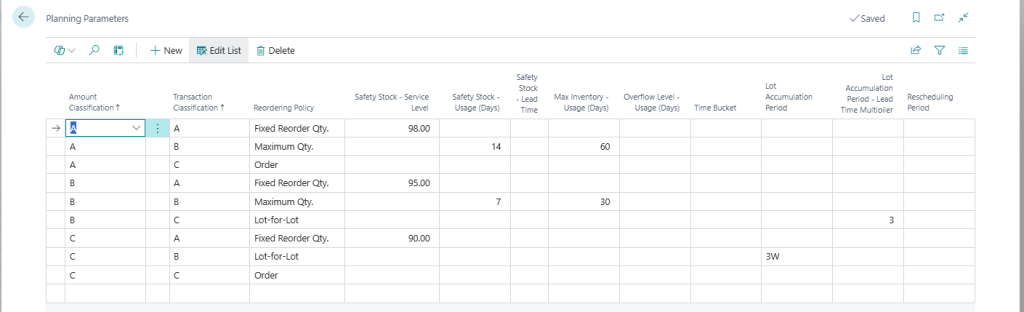
Reordering Policy – The Reordering Policy that should be used for Items/SKUs.
Safety Stock – Service Level – The Service Level that should be used for calculating the Safety Stock. The Service Level approach calculates the Safety Stock by taking the Standard Deviation for the usage on a monthly basis multiplied by a factor related to the Service Level. The result is a Safety Stock quantity that will meet the specified Service Level if the deviation remains as the historical values (E.g. a Service Level of 95% means that 95% of the times the items are available in stock).
Large variations in the historical usage will result in large safety stock.
Example if this is found in the examples section.
Safety Stock – Usage (Days) – This field is used to calculate a Safety Stock based on a number of days consumption. The daily consumption is calculated as: Average Monthly Usage * 12 / 365.
Safety Stock – Lead Time (%) – This field is used to calculate a Safety Stock based on the demand during the Items Lead Time. The Lead Time Demand is calculated as the daily consumption multiplied by the Items/SKUs lead time in days.
Note: If more then one of the Safety Stock calculations are used the system will add them together when calculating the Safety Stock.
Max Inventory – Usage (Days) – This field is used to calculate a Max Inventory based on a number of days usage.
Overflow Level – Usage (Days) – This field is used to calculate the Overflow Level based on a number of days usage.
Lot Accumulation Period – With this field you set the Lot Accumulation Period for the classification.
Lot Accumulation Period – Lead Time Multiplier – This field allows you to have the system calculate the Lot Accumulation Period based on the Lead Time of the Item. The fields is a ‘multiplier’ so a ‘3’ in the field will for example establish a Lot Accumulation Period that’s 3 times the Lead Time.
Note: If both of the Lot Accumulation Period options are populated then the system will add them together.
Rescheduling Period – This is used to define the Rescheduling Period for the classification.