The Planning Parameter Worksheet Setup is were you start setting up the extension. This table is accessible by searching or from the ribbon of the Planning Parameter Worksheet.
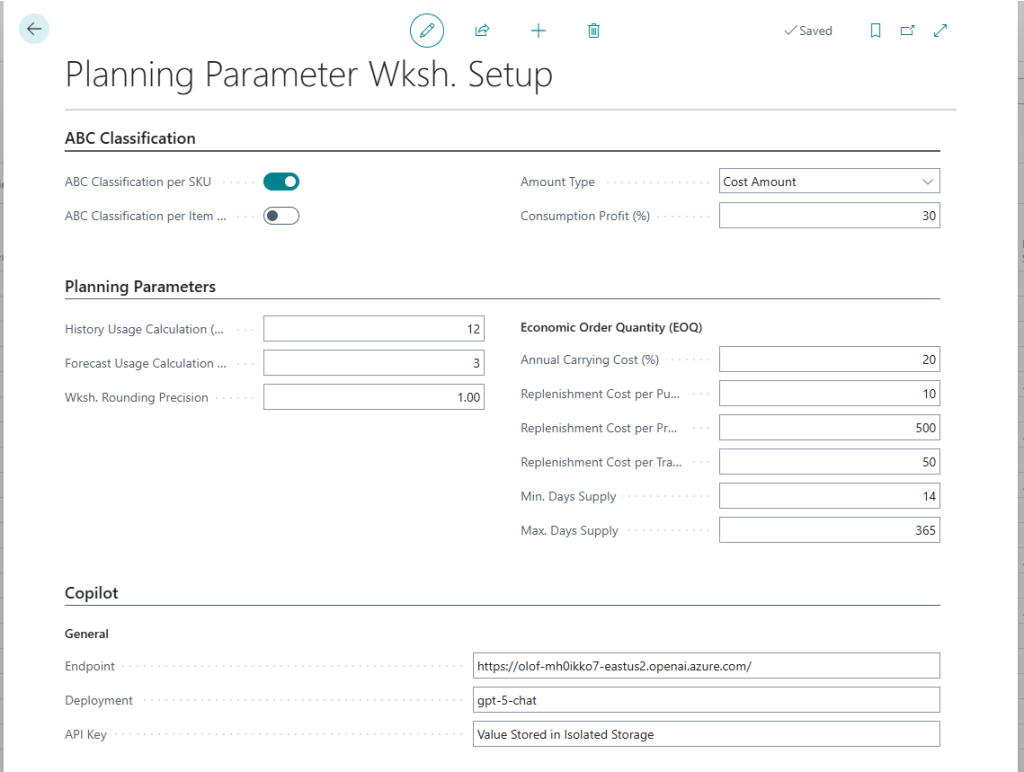
The ABC Classification tab of the Planning Parameter Wksh. Setup form includes general setup in relation to the ABC Classification.
ABC Class. per SKU – This field indicates if the system should calculate the ABC Classification according to Stockkeeping Units or Items. If the calculation is based on SKUs the total Amount and Quantity is calculated per Location.
ABC Class. per Item Category – A checkmark in this field will generate ABC Classifications per Item Category.
Amount Type – This field indicates if the Amount Classification should be based on the Cost Amount, Sales Amount or Profit Amount (Sales – Cost).
Consumption Profit (%) – If the Amount Type is set to Sales Amount or Profit Amount then the system uses this value in order to calculate the Sales Amount for Consumption and Outbound Transfer transactions (the Sales Amount = Cost Amount + Consumption Profit (%)).
The Planning Parameters tab of the Planning Parameter Wksh. Setup form includes some general setup in relation to the Planning Parameters.
History Usage Calc. (Months) – This field indicates how many months back in time the system will include when calculating the Average Monthly Usage. When the system calculates the Average Monthly Usage it ignores the current month and starts with the previous month and calculating the number of months backwards according to this field.
If an Item has not been used for the entire period the system will calculate the Average Monthly Usage from the first month the item has been used (E.g. a newly introduced Item might not have transactions 6 months back in time).
The Average Monthly Usage has an impact when the system suggests the planning parameters.
This field also indicates the number of months that will be used in order to calculate the deviation in usage.
Forecast Usage Calc. (Months) – If the Production Forecast is used the system can include this when calculating the Average Monthly Usage. This field indicates how many months ahead the system should look at the Forecast Entries. The system ignores the current month and starts with the next month and calculating forwards.
If Forecast Entries doesn’t exist for an Item/SKU the system will not include it in the calculation.
The Forecast Entries do not have any effect when the system calculates the deviation in usage.
Both Sales and Component Forecast Entries are included in the calculation and the system bases its calculation on the Current Production Forecast setup on the Manufacturing Setup form.
Wksh. Rounding Precision – This field specifies the size of the interval to be used when rounding the suggested parameters in the Planning Parameter Worksheet.
The system will suggest the Reorder Quantity (if Fixed Reorder Qty. is used as a Reordering Policy) based on the EOQ (Economic Order Quantity) formula. The EOQ formula is a way of finding the optimal balance between ordering costs and the costs of having items in stock. The EOQ is calculated according to the following formula:

Where the Replenishment Unit Cost is taken from the Last Direct Cost on the Item/SKU Card, the Monthly Demand is the Average Monthly Usage and the Annual Carrying Cost Percentage and the Reordering Cost is according to the setup below described bellow.
Annual Carrying Cost (%) – This is the average annual cost of maintaining inventory in your warehouse before it is sold, transferred or otherwise used (consumed). This typically ranges between 18% and 28% according to Microsoft Business Solutions.
Repl. Cost per Purchase Line – The cost of issuing, receiving and paying for a line on a purchase order. $5 – $6 is a typical value according to Microsoft Business Solutions. This value is used when calculating EOQ for items that are replenished by purchase.
Repl. Cost per Production Order – The cost of issuing, picking, starting and finishing a production order. This value is used when calculating EOQ for items that are replenished by producing.
Repl. Cost per Transfer Line – The cost of issuing, picking, shipping and receiving a line on a transfer order. This value is used when calculating EOQ for items that are replenished by transferring.
Min. Days Supply – Here it is possible to specify the minimum number of days of usage the order quantity should cover.
Max. Days Supply – Here it is possible to specify the maximum number of days of usage the order quantity should cover.
It is advised to test the setup by manually check the results using sample items that are representative of the variations of your inventory base.
For more detailed information about the EOQ we would recommend reading the Effective Replenishment Parameters document from Microsoft Business Solutions or searching the Internet.
Note: The Minimum Order Quantity, Maximum Order Quantity and Order Multiple on the Item/SKU can be used to setup the final adjustments to the Order Quantity on an Item level.
The Copilot tab contains the setup to link Business Central to your Azure OpenAI model. This configuration is necessary if you want to use Copilot to suggest planning parameters.
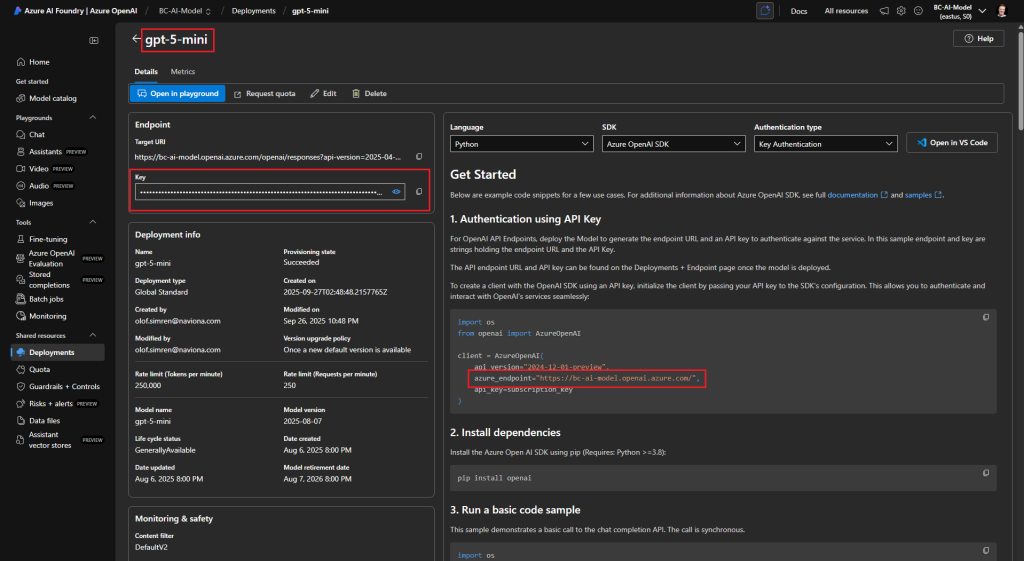
The Endpoint, Deployment and API Key are values that you find in your Azure OpenAI model according to below.