The following example is based on an Item with the sales history according to below and the calculations are done from August – 24 to June – 25.

When calculating the Safety Stock based on the Service Factor the system start with calculating the Standard Deviation of the historical monthly usage. The Standard Deviation formula:
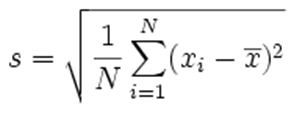
In practice the Standard Deviation is calculated by the following steps:
1. The average for all months is calculated
2. The difference between each month and the average is calculated
3. Square each difference
4. The average of the squares are calculated
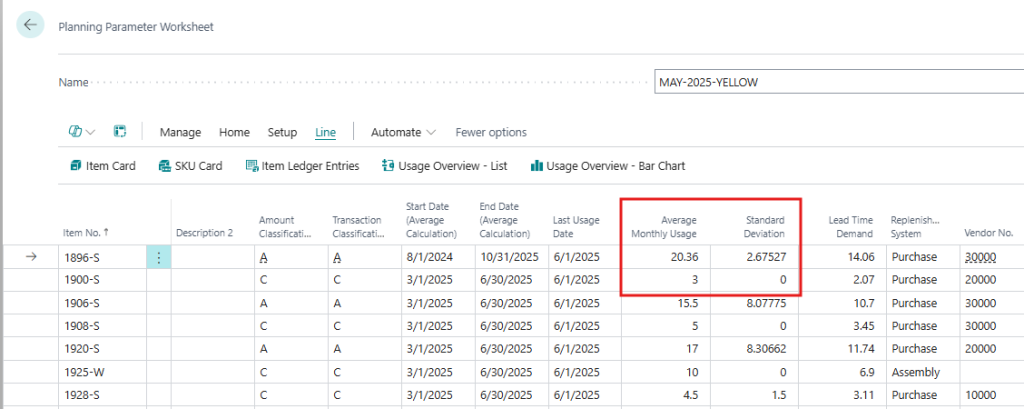
5. The average is square rooted Using the above steps gives us the Average of 20.36 and a Standard Deviation of 2.67527. This is the value presented in the work sheet like below.
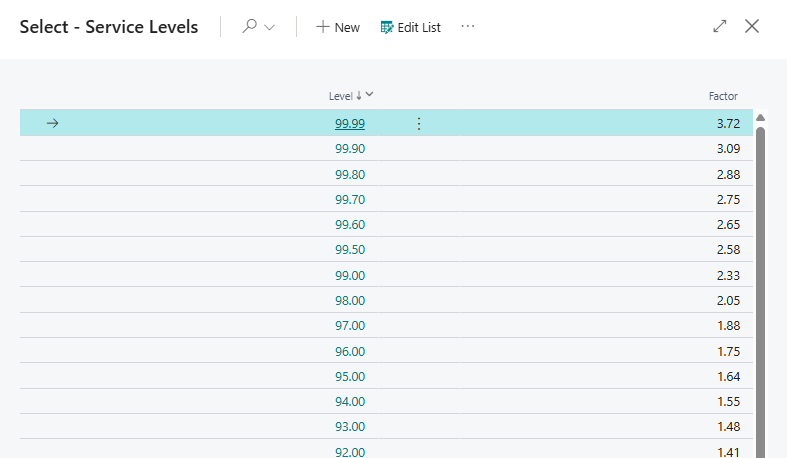
The Standard Deviation is then multiplied with a factor according to the Service Level. In this example the Item has a Service Level of 99% (AA Item), which gives us a factor of 2.33 (the factors in relation to the Service Levels are always the same and can be calculated using the formula NORMSINV in Excel). 2.33 multiplied with 2.67527 gives us a Safety Stock of 6.23 (if the item is handled in even units the system will round up the safety stock to 7 in this example).
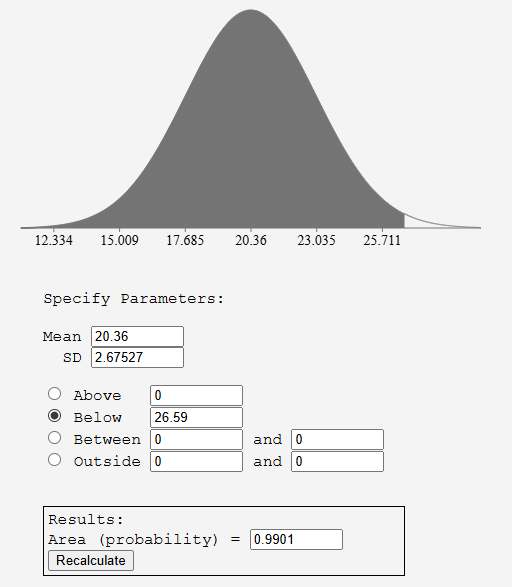
When making a Normal Distribution graph (based on our Mean and Standard Deviation) we could see that in order to cover 99% (the Service Level) of the cases (the Area under the graph) we will need to have a Safety Stock of 26.59 – 20.6 = 6.23 (26.59 is 6.23 more than the Average).